Getting Started With Version Control
What is a “version control System”?
Version control systems are a category of software tools that helps record changes to files by keeping a track of modifications done to the code.
Version control uses:
-
A repository: It can be thought of as a database of changes. It contains all the edits and historical versions (snapshots) of, your project.
-
Your working copy (sometimes called a checkout) : It is your personal copy of all the files in the project. You make yur own edits to this copy, without affecting the work of othera and you can finally commit your changes to a repository when you are done making your changes.
Why should we use it, what Purpose does it serve? Before getting to that let’s understand how it works with the help of its different types.
- Local Version Control Systems
It is on of the simplest forms and has a database that kept all the changes to files under revision control. RCS is one of the most VCS tools. It keeps patch sets (differences between files) in a special format on disk. By adding up all the patches it can then re-create what any file looked like at any point in time.
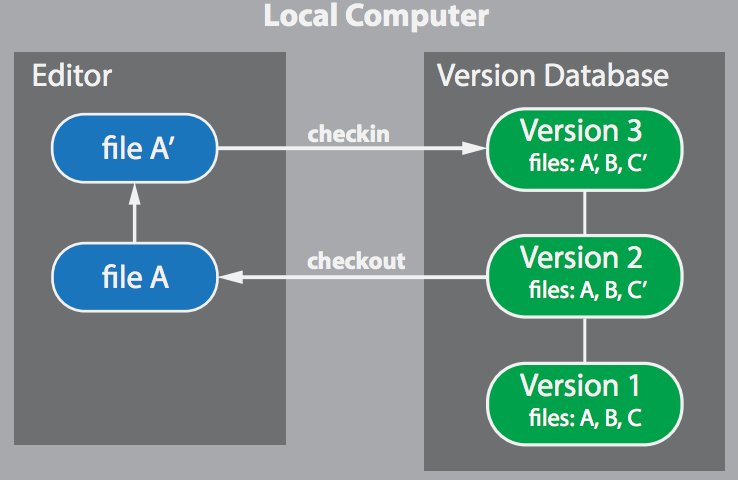
- Centralized Version Control Systems
Centralized version control systems contain just one repositoryand each user gets their own working copy. You need to commit to reflect your changes in the repository. It is possible for others to see your changes by updating.
For others to see your changes, 2 things must happen.
- You commit
- They update
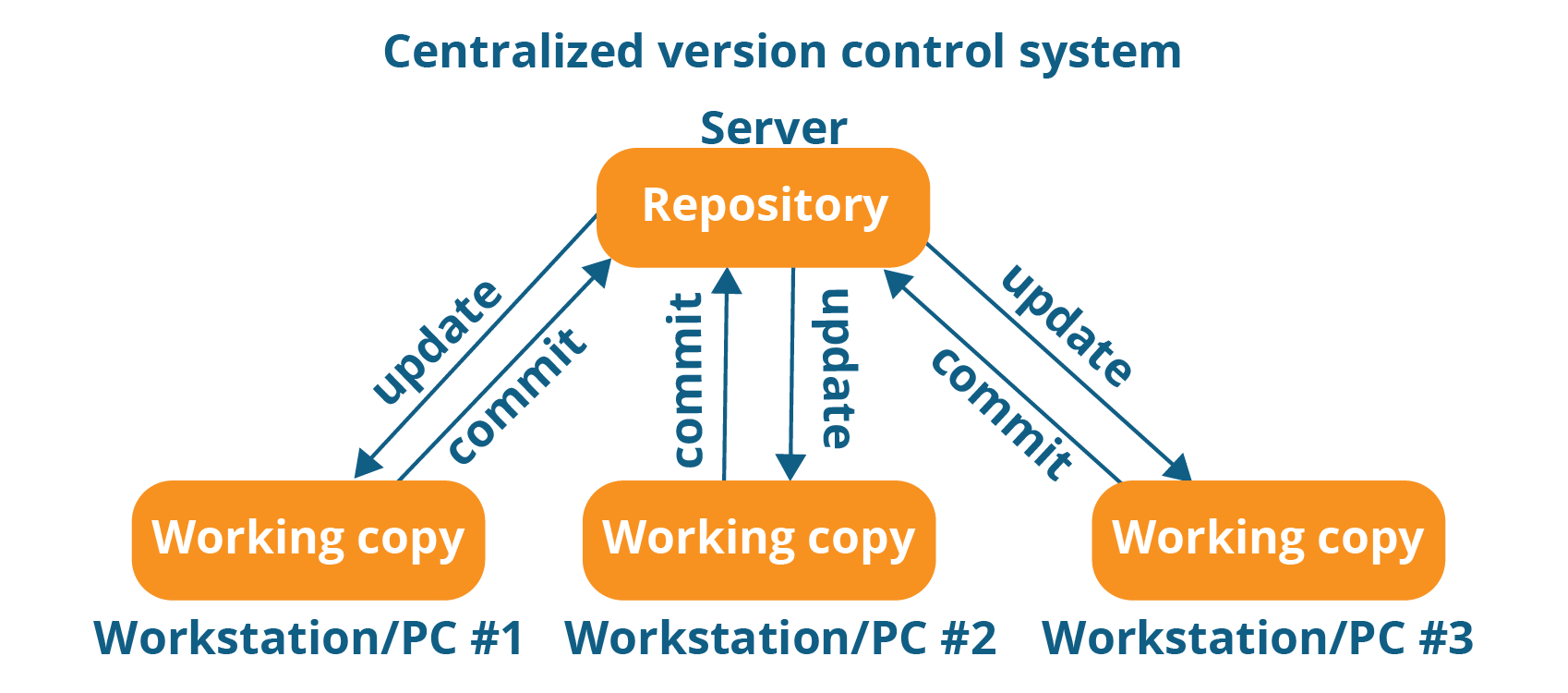
Looking at the benifits of CVCS, it made collaboration amongst developers possible along with providing an insight to a certain extent on what everyone else is doing on the project. It allows administrators to have a fine-grained control over who can do what.
It has some downsides as well which led to the development of DVS. The most obvious is the single point of failure that the centralized repository represents, if it goes down during that period collaboration and saving versioned changes is not possible. What if the hard disk of the central database becomes corrupted, and proper backups haven’t been kept? You lose absolutely everything.
- Distributed Version Control Systems
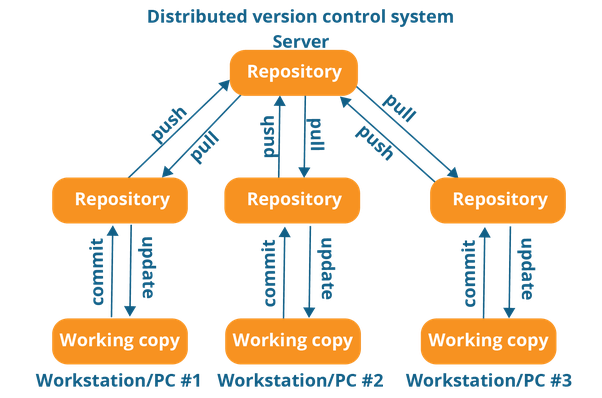
Distributed version control systems contain multiple repositories. Each user gets his or her own repository and working copy. Just commiting yor changes will not give others acces to your changes. Why so? This is because commit will reflect those changes in your local repository and you need to push them in order to make them visible on the central repository. Similarly, When you update, you do not get other’s changes unless you have first pulled those changes into your repository.
For others to see your changes, 4 things must happen:
- You commit
- You push
- They pull
- They update
The most popular distributed version control systems are Git, Mercurial. They help us overcome the problem of single point of failure.
Coming back to the why of its use and the purposes served by VC.
-
Version control enables multiple people to simultaneously work on a single project. Each person edits his or her own copy of the files and chooses when to share those changes with the rest of the team. Thus, temporary or partial edits by one person do not interfere with another person’s work.
-
It also enables one person to use multiple computers to work on a project, so it is valuable even if you are working by yourself.
-
Version control integrates work done simultaneously by different team members. In most cases, edits to different files or even the same file can be combined without losing any work. In rare cases, when two people make conflicting edits to the same line of a file, then the version control system requests human assistance in deciding what to do.
-
Version control gives access to historical versions of your project. This is insurance against computer crashes or data lossage. If you make a mistake, you can roll back to a previous version. You can reproduce and understand a bug report on a past version of your software. You can also undo specific edits without losing all the work that was done in the meanwhile. For any part of a file, you can determine when, why, and by whom it was ever edited.
Let me know what you think of this article on twitter @Soumya27331438 or leave a comment below!