acpid command in linux with examples
The acpid daemon provides intelligent power management on a system and allows to query battery and configuration status by supporting the Advanced Configuration and Power Interface (ACPI). The ACPI events are notified to the user-space programs by acpid.
Note: The ACPI (Advanced Configuration and Power Interface) specification allows the operating system to control the amount of power it provides to each device or peripheral attached to the system. This makes the operating system to turn off specific devices when they are no longer in use such as the monitor, providing stable and efficient power management.
Acpid being a daemon runs as a background process by default and it should start during the system boot. Whenever an event occours it executes programs to handle the event. It does so as it opens an </b>events file (/proc/acpi/event by default)</b> and reads all the lines. When a line is received (an event), it examines a list of rules to execute the one that matches the event. If there is a lock file (/var/lock/acpid by default) it ignores all incoming ACPI events.
Simple configuration files are used to define the rules. It looks in a configuration directory (/etc/acpi/events by default) and all the files that do not begin with a period (‘.’) or end with a tilde (~) are parsed. Each file must define an event and a corresponding action. Blank lines or lines with the first character as hash (‘#’) are ignored.
There are three tokens in each line: the key, a literal equal sign and the value.
The key can take up to 63 characters, is case-insensitive but whitespaces matters. The value can take up to 511 characters, it is case and whitespace sensitive. The event value consists of a regular expression and events are matched against it.
Installation:
sudo apt-get install acpid
Synopsis:
acpid [options]
Options:
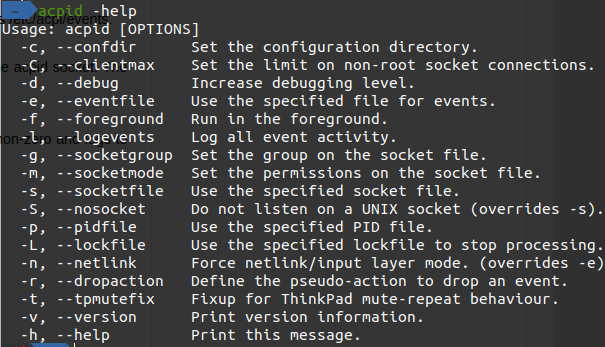
c, –confdir directory Changes the directory that acpid looks for rule configuration files. The default directory is /etc/acpi/events.
C, –clientmax number Changes the maximum number of non-root socket connections that can be made to the acpid socket. The default is 256.
d, –debug Increases the acpid debug level by one. It runs in the foreground if the debug level is non-zero and logs to stderr and to the regular syslog.
e, –eventfile filename Changes the event file. Acpid reads events from it. The default file is /proc/acpi/event.
f, –foreground Keeps acpid in the foreground by not forking at startup.
l, –logevents Tells acpid to log information related to all the events and actions.
L, –lockfile filename Changes the lock file that is used to stop event processing. The default file is /var/lock/acpid.
g, –socketgroup groupname Changes the group ownership of domain socket. Acpid publishes events to it.
m, –socketmode mode Changes the permissions of the UNIX domain socket. Default is 0666.
s, –socketfile filename Changes the name of the UNIX domain socket that is opened by acpid. The default is /var/run/acpid.socket.
S, –nosocket filename Tells acpid to not open a UNIX domain socket. This overrides the -s option, it als negates all other socket options.
p, –pidfile filename Tells acpid to use the specified file as its pidfile. If the file exists, it will be removed and over-written. The default is /var/run/acpid.pid.
v, –version Prints the version information and exits.
Output:

h, –help
Shows help and exits.
Output:
Service Control
Use the service utility for controlling the acpid service:
service acpid
Output:

To Start the service:
service acpid start
You will be prompted for authentication.
To Stop the service:
service acpid stop
Output:

You will be prompted for authentication.
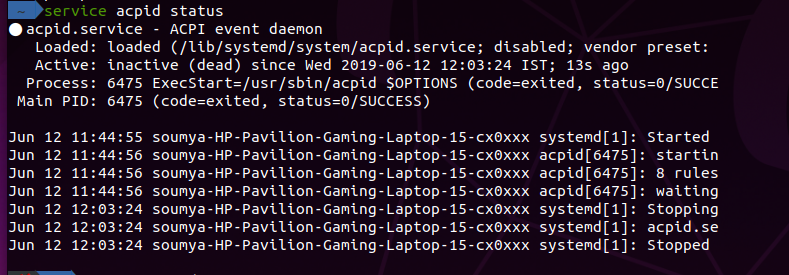
Check if the serivce is started or stopped:
service acpid status
Output:
Let me know what you think of this article on twitter @Soumya27331438 or leave a comment below!